Agents take turns
Two AI agents can share one device. Silan says whose turn it is.
Silan is a Mac app that connects your AI agent to a phone, tablet, simulator or emulator. The agent sees the live screen and taps, types and swipes in any app. You can take over at any time.
macOS 15 or later on Apple silicon
Connect Claude Code, Codex, Cursor, OpenCode, the Claude app or another agent over MCP, a common way for agents to use tools. Or use the agent built into Silan.
YOUR AI AGENT
MCP · REST · WebDriver
silan command
Silan
The app in the middle,
on your Mac
Cable or Wi-Fi
YOUR DEVICES
Every tap shows on the live screen and in the chat.
01 / 07
The agent reads the screen and taps like a finger. Your app needs no test build. Take over at any time.
Done on the iPhone · 1:59
Apartment in Estrela
Rated 4.91 from 367 reviews. $212 in total for the two nights. Nothing booked or saved.
Save as a flowRun again
02 / 07
Say the job once. Silan splits it into one job per device. One job can wait for another.
Working · 2 phones: 2 working
A job for each of 2 devicesTHE PLAN
iPhone waits for Silan iPad to share “cheapest_date”, up to 5 min
Silan iPadRunning
Thinking…
SteerTake overStop
iPhoneRunning
Waiting for Silan iPad to share “cheapest_date”
Silan iPad · Simulator
iPhone · Cable
cheapest_date: not shared yet
03 / 07
It asks before it pays, sends, posts or deletes. One shortcut, ⌃⌥⌘., stops every agent on every device.
Working · 2 phones: 1 needs you, 1 working
iPhoneNeeds youRunning
Waits for your yes
Built-in agent wants to tap the “Search” button in YouTube on iPhone
com.google.ios.youtube is not on the agents' allow list. · iPhone
For this chatApproveStop
Silan iPadRunningNeeds you
Making a plan
04 / 07
Vault keeps your logins. Silan types them in, so the agent never sees the password.
Working · 0:45 · on iPhone
Demo site loginVault · username and password
Only in SafariAsk every time
05 / 07
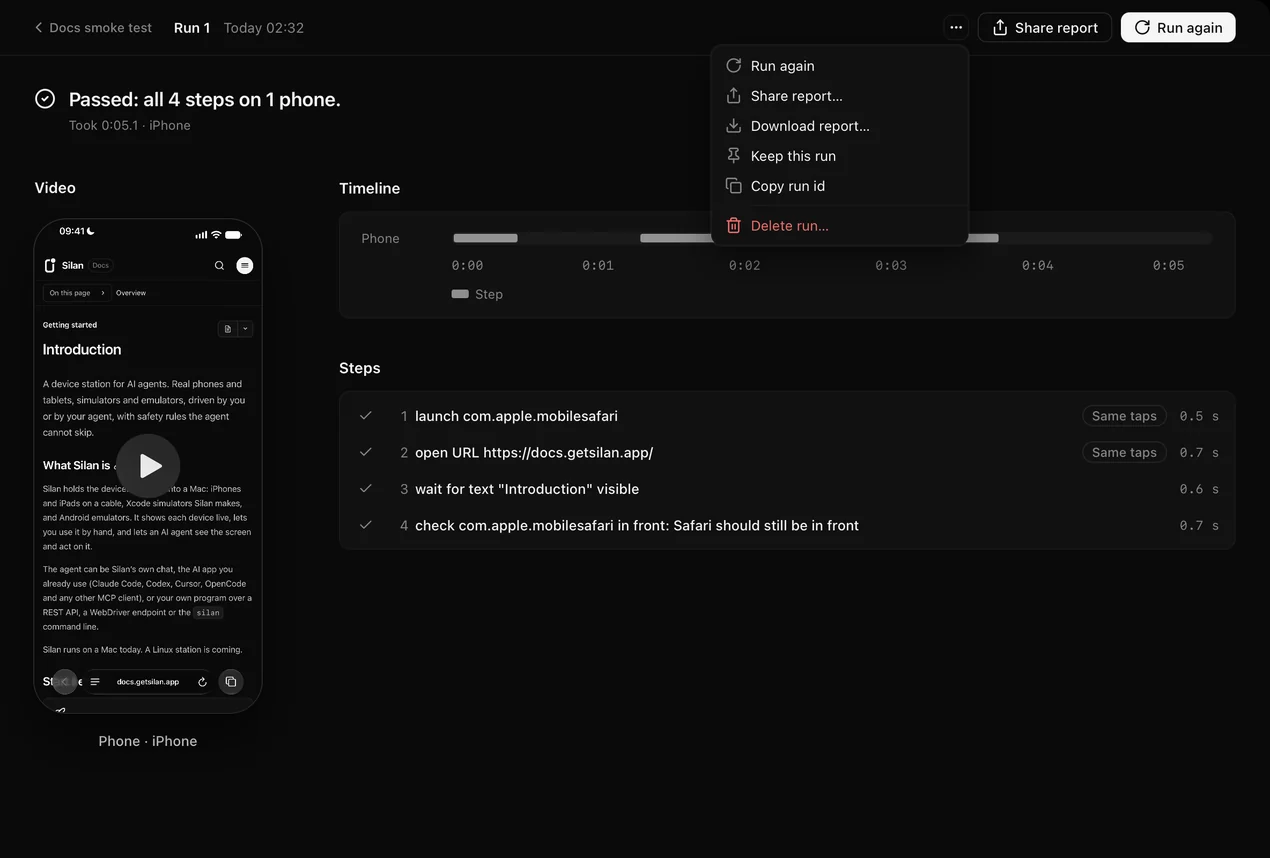
Save the steps that worked as a flow. Run it every day, and hear only when a run fails.
Docs smoke testRun now
Run 1 · Today 02:32 · 0:05
Every day at 07:00Tells you only when it fails
Passed, all 4 steps on 1 phone
06 / 07
A screenshot of every step the agent took. Each run also records a video of every device.
07 / 07
Share devices with your team. See who has each one and who is next.
Team devices3 people · 2 Macs
Test iPhone 15Cable · Office Mac
MLMaya has it · Leo is next
Test iPadWi-Fi · Lab Mac
Free
ACTIVITY
iPhone and iPad on a cable, iOS simulators and Android emulators. iPhone and iPad also work over Wi-Fi. This needs Xcode and one cable connection first. Up to 60 frames a second over a cable.
See every deviceTwo AI agents can share one device. Silan says whose turn it is.
The simple way needs no Xcode. Tap Trust to see the screen. Two more minutes of setup lets Silan tap and type.
Hear the device. Take a screenshot at any moment.
The phone is on your desk, so your screens stay on your Mac.
ONLY ON SILAN
Five things you will not find in a cloud phone or a test framework.
Not here? Write to juwon@getsilan.app
A Mac app that lets AI agents use phones, tablets, simulators and emulators. The agent sees the live screen and taps, types and swipes in any app.
iPhone and iPad on a cable, iPhone and iPad simulators, and Android emulators. iPhone and iPad also work over Wi-Fi. This needs Xcode and one cable connection first. Real Android phones are not tested yet.
Claude Code, Codex, Cursor, OpenCode, the Claude app and any other agent that supports MCP. You can also use the agent built into Silan, or drive a device from the REST API, WebDriver or the silan command.
Team is for people who share devices across Macs. Write to us for a price.
Runs, screenshots and run videos stay on your Mac. The local API answers only on your Mac. The screens the agent looks at go to the AI provider behind that agent, under that provider’s terms.
Not for a real iPhone or iPad. The simple way needs no Xcode. Plug in and tap Trust to see the screen. Two more minutes of setup lets Silan tap and type. iOS simulators need Xcode.
No. It asks before it pays, sends, posts or deletes, and you choose: just this once, for this chat, or not at all. One shortcut, ⌃⌥⌘., stops every agent on every device.
Not yet. Silan runs on macOS 15 or later on Apple silicon today. Linux is coming soon.